Humanize AI Text with ezHumanizer
Use ezHumanizer to convert your AI-generated content into natural, authentic, and human-like writing.
Use ezHumanizer to convert your AI-generated content into natural, authentic, and human-like writing.
 Easy to Use
Instant Processing
Get Human-Like Results
Easy to Use
Instant Processing
Get Human-Like Results
 RECENT HUMANIZATIONS
PRO
RECENT HUMANIZATIONS
PRO

ezHumanizer is an AI humanizer that rewrites your AI-generated text from ChatGPT, Gemini, Jasper, DeepSeek, Claude, and other tools into natural, human-like content instantly. During humanization, it restructures sentence rhythm, swaps robotic phrases, and breaks AI patterns without changing the original meaning.
How it works
01
Type, paste, or upload your text into the input box
02
Select a humanization mode: Basic or Advanced
03
Click "Humanize" to get natural, human-like text

WHY IT'S DIFFERENT
Our AI Humanizer goes beyond basic AI rewriting. Built with advanced AI and LLM technology, it contextually humanizes AI text, delivering more natural and tailored humanization.
01 · SENTENCE PAIRING
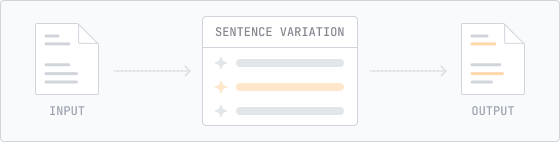
Instead of treating your text as one large block, our humanizer splits it into individual sentences, contextually refines each one, and puts them back in order. You can compare any sentence against the original and click to rephrase it if needed.
S₁ · paired
"Furthermore, AI…"
S₁ · output
"So AI has…"
02 · Instant Results
Our AI humanizer processes your text quickly, so you can get natural sounding results without unnecessary waiting.

03 · DIFF VIEW
You can track every edit with precision. Just enable Diff View and changed words will be highlighted in green.
04 · LANGUAGES
ezHumanizer supports English, Spanish, and Portuguese, helping you humanize text naturally while maintaining the language’s context and meaning.
05 · REGENERATE
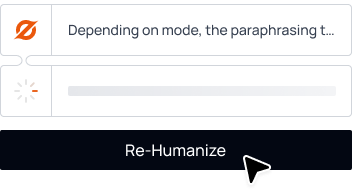
Not happy with the first output? You can “Re-Humanize” the whole draft and get a different version.
06 · HISTORY
Pro users get an unlimited timeline of past humanizations.
07 · EXTENSION
Its Chrome extension let you humanize AI text right on the spot anywhere on the web. without leaving the page.
08 · MOBILE APP
ezHumanizer is now available in iOS and Android mobile apps. You can humanize your AI-generated text wherever you write-even on the go.
THE CRAFT
Maximum Changes
Unlike other AI humanizers that just replace words with synonyms, ezHumanizer restructures your entire sentences to match human writing patterns.
BURSTINESS + PERPLEXITY CONTROL
This AI to human text converter tunes both Burstiness and Perplexity directly to give your writing more natural rhythm and variation like that of human-written text.
Perplexity
84.2
Burstiness
71.6
Improves Readability
During humanization, our tool adds soft transitions, natural pauses, and a more natural flow, turning your AI-generated text into engaging, easier-to-read output.
VOCAB SWAP
Our tool replaces robotic and unnatural wording such as "delve," "moreover," "furthermore", and others with simple vocabulary.
Native Models
For every supported language, our humanizer has dedicated fine-tuned model, delivering more natural and context-aware humanization.
TWO MODES
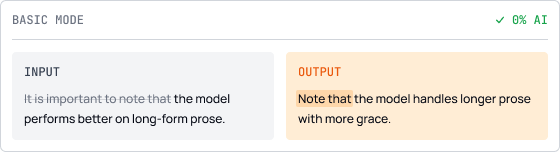
01
It quickly does balanced rewrites and makes your writing sound smoother and more natural, while keeping the meaning unchanged.
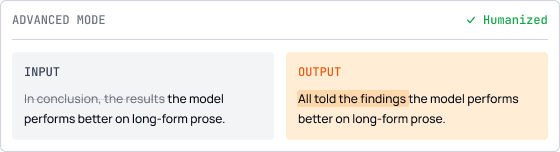
02
It deeply modifies sentences, varies their length, refines flow, and delivers more authentic, human-like output.
USE CASES
Marketers
They can use the humanizer to turn their robotic-sounding copies for campaigns and reports into natural, engaging writing.
Content Creators
Our text humanizer helps content writers and bloggers to refine AI-generated drafts into authentic and truly human-like writing.
SEO Teams
This tool is useful for SEO professionals and website owners to help them instantly enhance the readability and engagement, helping their content rank higher.
Professionals
Our text humanizer helps professionals transform rigid or robotic-sounding emails, proposals, or business reports into more natural and authentic writing.
Job Seekers
AI generated resumes and cover letters can sometimes feel generic or repetitive. ezHumanizer helps improve the wording, clarity, and flow while keeping your original message intact.
Social Media Managers
The text humanizer helps social media users to improve AI-drafted captions, posts, or tweets into compelling and fluent ones without changing meaning.
VS . THE REST
| Features | ezHumanizer | AIHumanize.io | Quillbot | Humanizeai.pro |
|---|---|---|---|---|
| Sentence-level pairing | ✓ | — | — | — |
| Humanizing Modes | ✓ | ✓ | — | ✓ |
| Diff view | ✓ | ✓ | ✓ | — |
| Rewrite Individual sentence | ✓ | — | — | — |
| Per Submission Limit (Free Plan) | 700 Words | 200 Words | 125 Words | 250 Words |
| Mobile APP | ✓ | — | ✓ | — |
| Chrome extension | ✓ | — | ✓ | — |
FAQs
No sign-up needed. Try it for free.
 Preserves Meaning
Refine Writing Tone
Natural & Human-Like Results
Preserves Meaning
Refine Writing Tone
Natural & Human-Like Results



 Thanks for the feedback.


