ezHumanizer vs Quillbot's AI Humanizer: An Honest Comparison
If you write with ChatGPT, Claude, Gemini, or other tools, you have seen that AI drafts often have the same problem. The information is fine, but they have sentences of the same length, repeated words, phrases, and transitions like “in these days”, “furthermore”, and “delve” everywhere.
These things make AI-generated writing sound stiff and boring to read. People use AI humanizer tools to fix this.
ezHumanizer and Quillbot’s AI Humanizer are the two names that come up a lot. Both work to refine AI-written drafts so they read more naturally. However, they work differently. In this blog, we’ll compare these humanizers based on their interface, main features, how they work, and pricing.
Disclosure: This post is published on ezHumanizer, so we’re biased. But our provided details are accurate; you can check on both sites. Where Quillbot is stronger, we mention it.
Overview of ezHumanizer
ezHumanizer is an AI humanizer designed to help you automatically rewrite AI content into more authentic, readable, and natural output. When content is passed through the tool, it scans the syntax and context, then applies different changes to make it sound human-like.
It is a versatile tool to humanize various types of written content, including marketing copy, blog posts, research articles, email copies, product descriptions, and more.
Overview of Quillbot
Quillbot's AI Humanizer instantly refines AI-assisted drafts by removing repetitions, changing sentences, and breaking sentence patterns. You can use it to polish everyday writing tasks like reports, social media captions, and emails.
Features Comparison: ezHumanizer vs Quillbot’s AI Humanizer
Interface and Ease of Use
Both tools provide a straightforward way to enter your text and start humanization; let’s explore each.
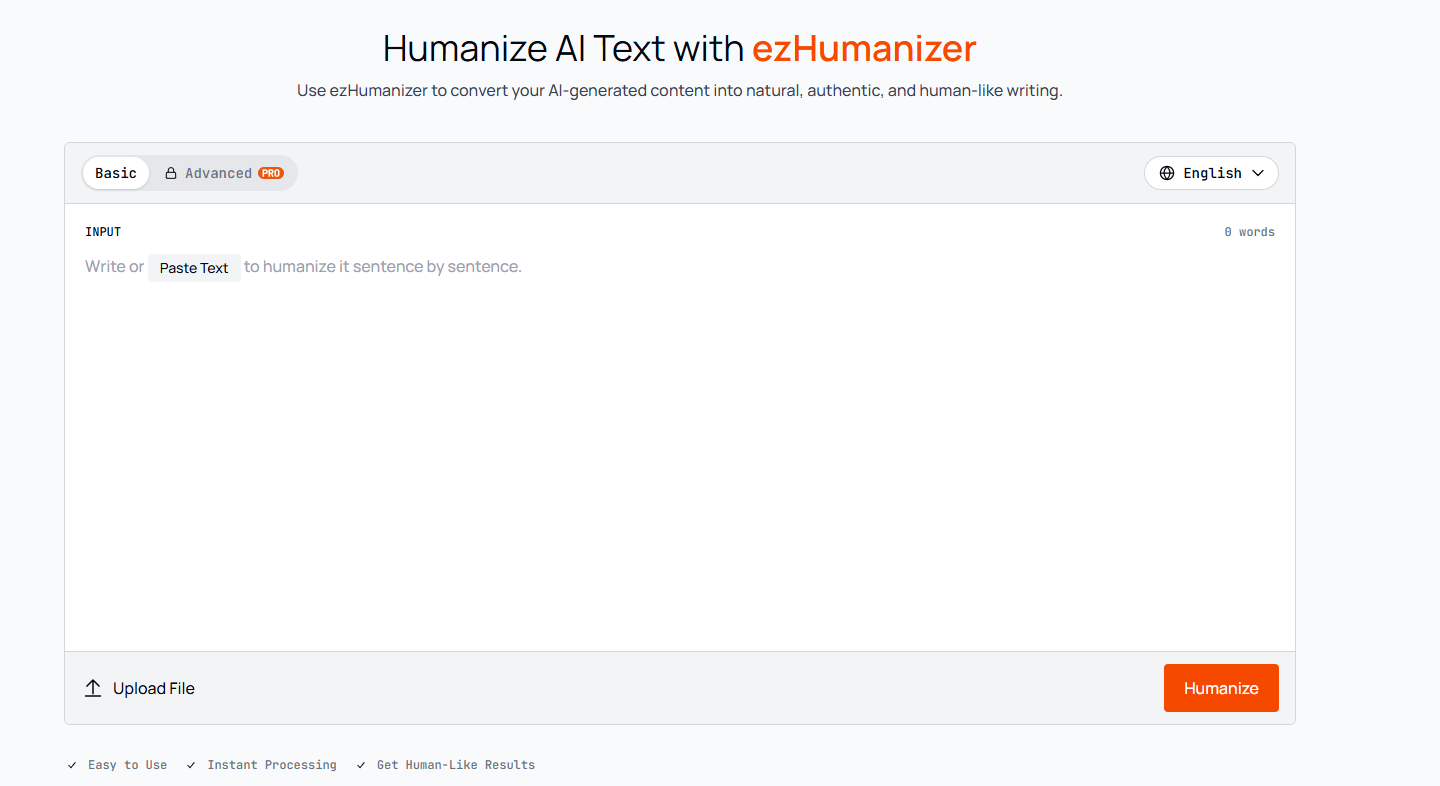
ezHumanizer features a large input box with main control options arranged around it. You can easily select a mode, choose a language, enter or paste your text, and click the Humanize button to start. Its interface also includes a file upload option. If your AI-written draft is saved as a PDF, TXT, or DOCX on your device, you can upload it directly and humanize it.
After humanization, it shows both input and output side by side, allowing users to easily review. The overall workflow in ezHumanizer is quite simple, so even first-time users can run it effortlessly.
Here’s the user interface of ezHumanizer:
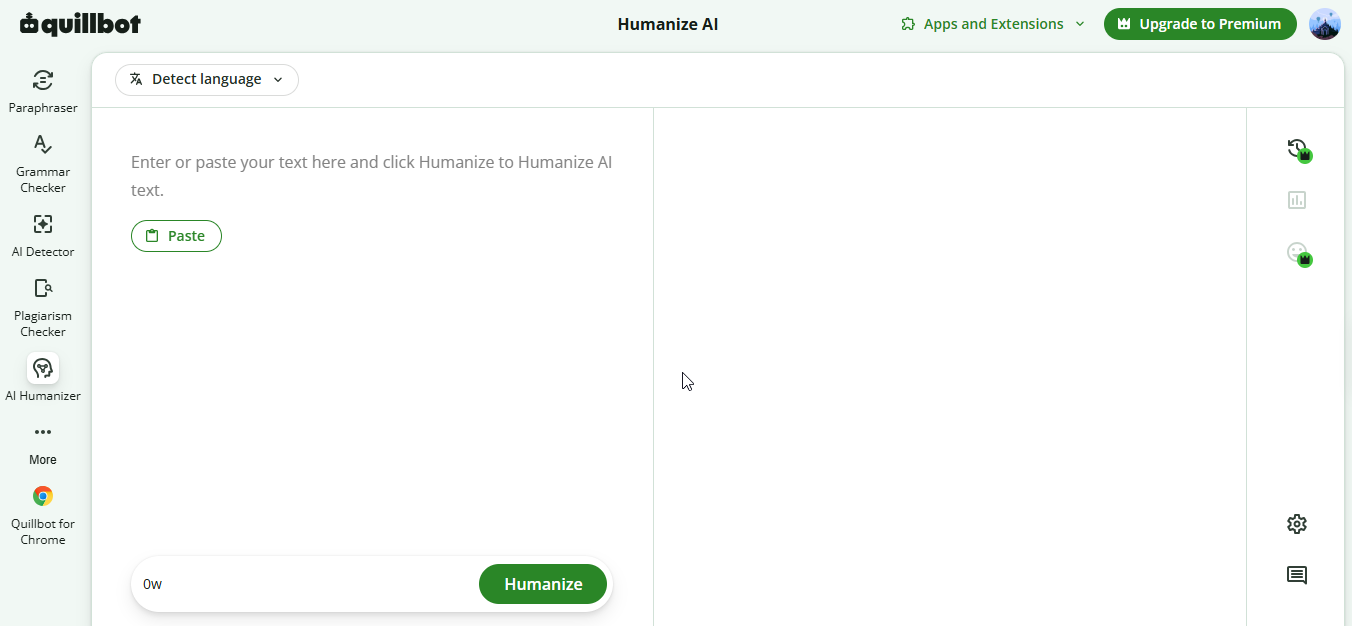
Quillbot’s AI Humanizer also provides a large input area like ezHumanizer. However, we didn’t see an upload option; the only input method is to paste their text directly. To use Quillbot, enter the text and click the Humanize button to start. It also shows the original text and the humanized version side by side. Its language selector allows you to select a suitable language.
The image below shows the user interface of Quillbot:
Changes View (Diff)
This feature is beneficial for tracking what edits or refinements are done to your writing by AI humanizer. Let’s see which tool offers this and in what way.
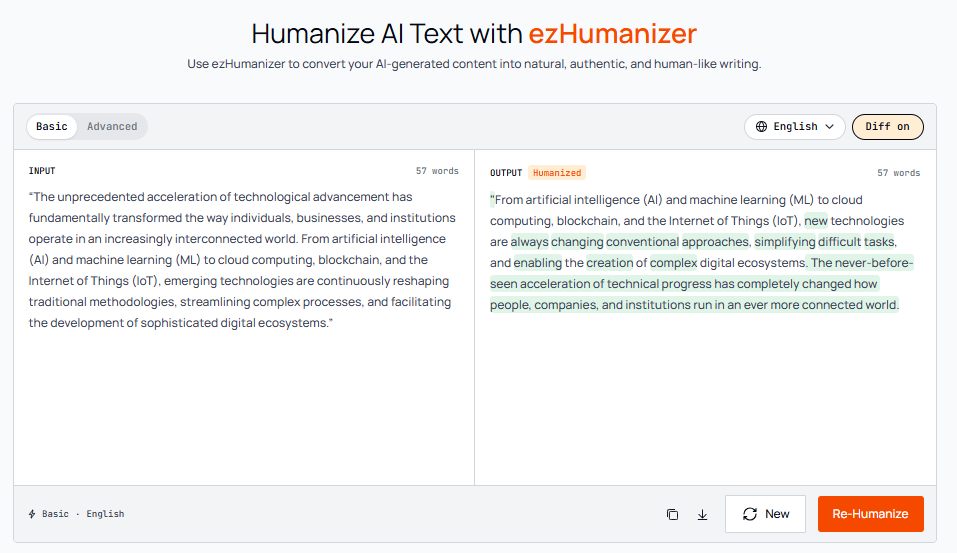
ezHumanizer offers a “Diff View” toggle, turn on it, and the tool will highlight all the changed words and phrases in green. This feature helps you check exactly what the tool edited during humanization.
Here ‘s the pictorial demo of “Diff View”
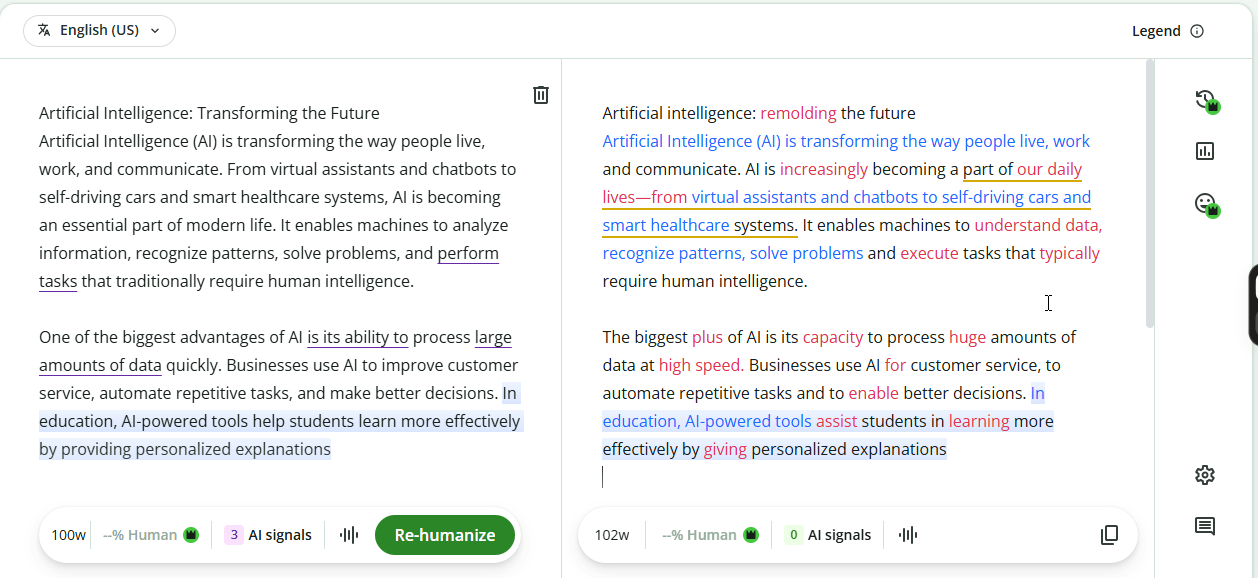
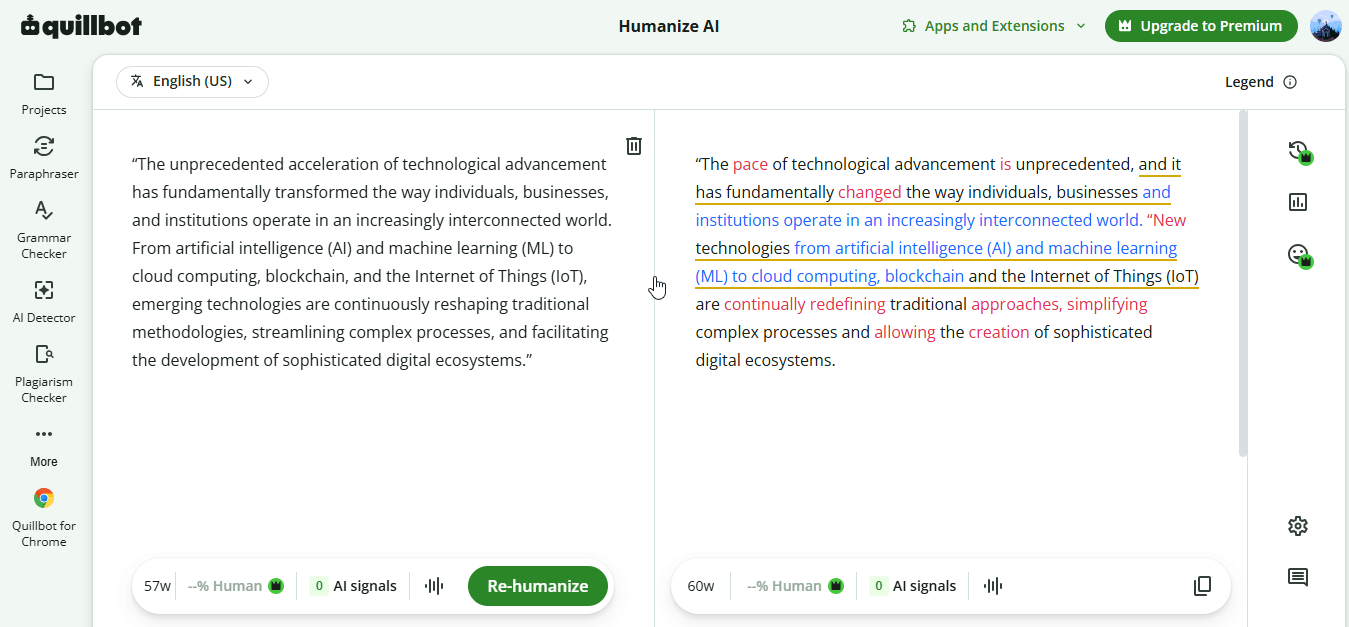
Like ezHumanizer, Quillbot also highlights changed words in different colors in the output. However, this feature is by default; we didn’t see any toggle for it, and Quillbot’s page doesn’t mention it as a named feature.
Here’s the demo:
Humanization Levels or Modes
Not every writing needs the same level of humanization, so the availability of different modes in a tool lets you choose how big changes you want. Let’s see which AI Humanizer wins this feature comparison.
ezHumanizer comes with two different humanization modes that are named: Basic and Advanced.
The Basic mode is free, and it does balanced rewrites to your writing while keeping the overall sentence rhythm, tone, and meaning almost the same. It makes your writing smoother and more natural.
The Advanced mode is premium. It changes your sentences more deeply, varies their lengths, and makes stronger vocabulary swaps, delivering a totally different version while keeping the meaning the same.
On the other hand, we didn’t see any humanization mode in Quillbot’s AI Humanizer. It rewrites every draft, making the same level of changes to it.
So, the availability of different humanization modes gives ezHumanizer a clear edge over Quillbot’s AI Humanizer. In other words, ezHumanizer gives you more control over how your text is refined than Quillbot.
Free Word & Daily Limits
The free word limit determines how much text you can humanize at once without splitting content into pieces and how often you can use the tool without upgrading. Both AI humanizers provide free versions for new users.
Let’s first look at Quillbot; its AI text humanizer lets you process 100 words per submission, with a small daily usage limit (6 runs when we tested). Imagine if you need to humanize a 1000-word piece of content, you’ll have to divide it into 10 pieces; besides that, you can only rewrite just 600 words in 6 runs. In order to humanize the complete content, you would need to wait for the usage limit to reset or buy Quillbot’s Premium.
Now come to ezHumanizer…
With ezHumanizer’s free version, you can humanize up to 700 words per submission, and the free plan includes 2.5K credits (1 credit per word, about 2,500 words). So, in the case of ezHumanizer, a 1,000-word piece takes just 2 runs.
In conclusion, ezHumanizer wins here. Its free plan handles far more words than that of Quillbot.
Pricing Comparison
Price matters. Let’s compare the premium plans of both humanizers to see which tool offers better value.
ezHumanizer's published pricing page lists the following premium plans:
Pro monthly: Listed at $6/month.
Pro yearly: Listed at $60/year, equivalent to approximately $5 per month when averaged across the year.
This plan comes with access to Advanced mode, 100K to 1.2M credits, a higher per-submission word limit of up to 2500 words, 30 days of history, per-sentence rephrase, and priority support.
On the contrary, Quillbot’s billing page lists a premium price of $9.95 USD/month. If you pay quarterly, the price reduces to $6.65/month, and with annual billing it drops to $4.17/month. The premium comes with no word count limit, history, and access to Quillbot's other writing tools like; paraphraser, summarizer, grammar checker, plagiarism checker, etc.
Verdict: It depends on how you want to pay. If you want to buy a monthly plan, ezHumanizer Pro is cheaper. However, Quillbot’s Premium is cheaper on annual billing.
A Side-by-Side Working Comparison
To test which tool is better at text humanization, we generated an AI paragraph from ChatGPT and passed it through both tools and reviewed the results. We did it exactly like a real-world user, with pictorial demonstrations shown for each step.
Here’s the AI Paragraph that we created with ChatGPT:
“The unprecedented acceleration of technological advancement has fundamentally transformed the way individuals, businesses, and institutions operate in an increasingly interconnected world. From artificial intelligence (AI) and machine learning (ML) to cloud computing, blockchain, and the Internet of Things (IoT), emerging technologies are continuously reshaping traditional methodologies, streamlining complex processes, and facilitating the development of sophisticated digital ecosystems.”
We copy that AI-generated content and paste it into ezHumanizer as it is, without any editing or humanization.
Humanized Text by ezHumanizer:
"From artificial intelligence (AI) and machine learning (ML) to cloud computing, blockchain, and the Internet of Things (IoT), new technologies are always changing conventional approaches, simplifying difficult tasks, and enabling the creation of complex digital ecosystems. The never-before-seen acceleration of technical progress has completely changed how people, companies, and institutions run in an ever more connected world. |
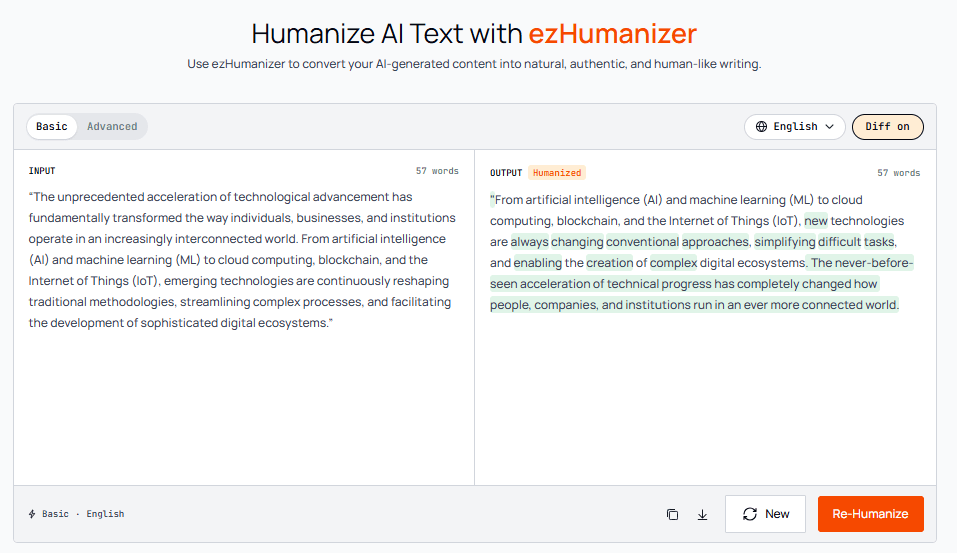
After humanizing, we passed the output through a well-known AI detector, “GPTZero”.
ezHumanizer’s Output checked by GPTZero:
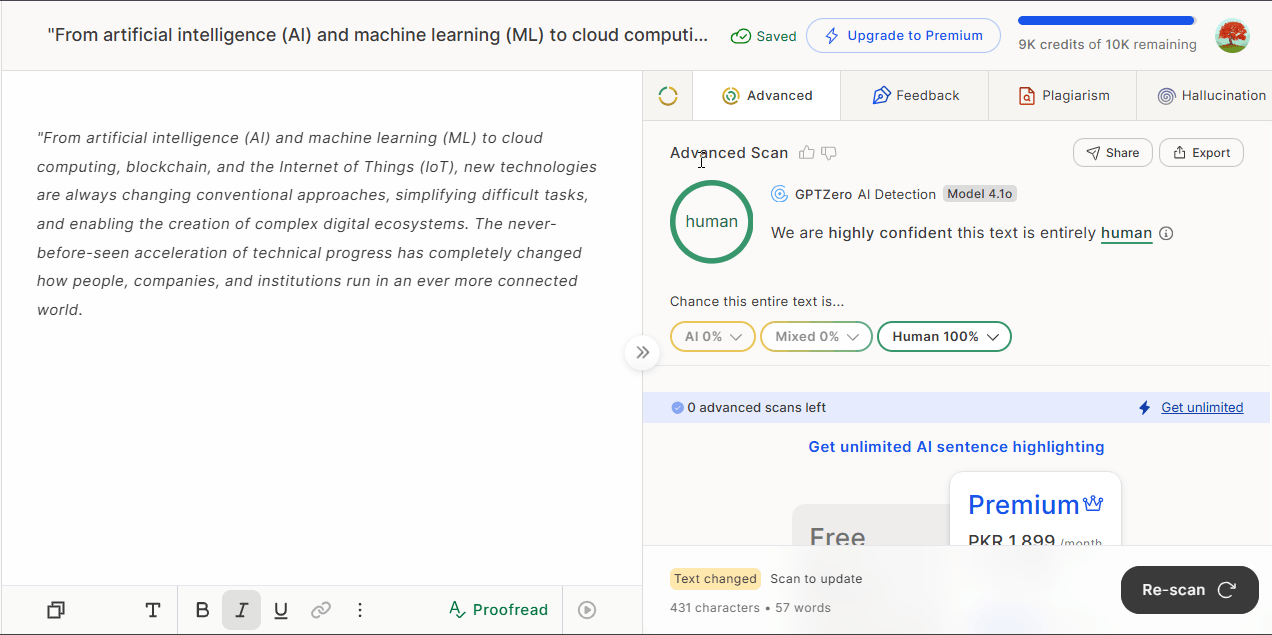
After checking ezHumanizer’s humanized text with GPTZero, the results were;
We are highly confident this text is entirely human.
AI: 0%.
Mixed (AI+Human): 0%
Note: This doesn’t mean that ezHumanizer bypasses every AI detector. But, it's the significant improvements and changes made by the tool that make robotic content sound natural like that of human writing.
Then we processed the same AI paragraph through Quillbot’s AI Humanizer.
Humanized Text by Quillbot:
“The pace of technological advancement is unprecedented, and it has fundamentally changed the way individuals, businesses, and institutions operate in an increasingly interconnected world. “New technologies, from artificial intelligence (AI) and machine learning (ML) to cloud computing, blockchain, and the Internet of Things (IoT), are continually redefining traditional approaches, simplifying complex processes, and allowing the creation of sophisticated digital ecosystems. |
Here’s the pictorial demo:
However, when we checked the output of QuillBot’s AI humanizer with GPTZero, the results were not up to expectations;
Here’s the GPTZero’s result about Quillbot’s AI Humanizer:
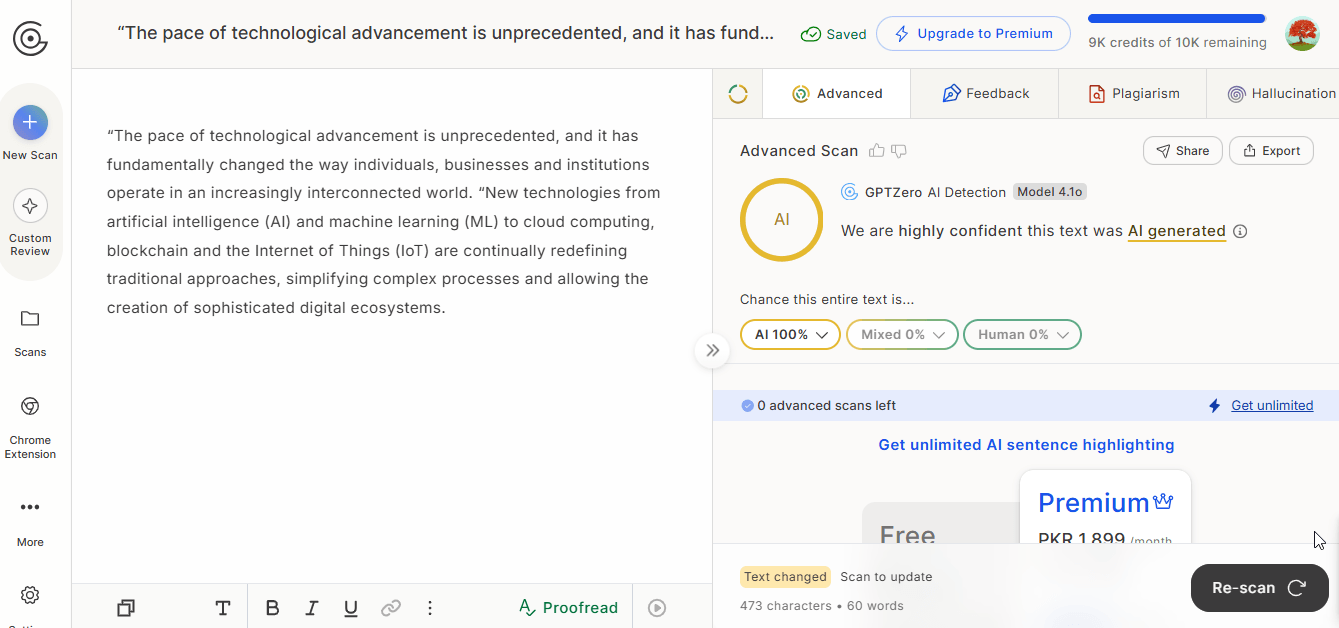
GPTZero’s result showed:
We are highly confident this text was AI generated
AI: 100%
Mixed: 0%
Human: 0%
This shows a critical issue: the humanized text by Quillbot was still detected as 100% AI.
Now, beyond AI detection, let’s review the results of both AI humanizers manually:
What ezHumanizer Did to the AI Content
Looking back at humanized version of ezHumanizer, we noticed:
It made significant modifications to the content.
It changes the overall order of sentences and swapped their words as well.
It replaced complex phrases such as “traditional methodologies” and “facilitating the development of” with simpler ones.
Additionally, ezHumanizer shortened and rearranged many phrases so the text flows naturally.
It shortened and rearranged several phrases so the text flows more naturally.
What Quillbot’s AI Humanizer Did to the AI Content
The AI Humanizer by Quillbot just made some small changes to the AI content. If you check Quillbot’s results from above, you’ll see that it just rebuilt the opening sentence and replaced a few words such as "emerging" with “new”, and “reshaping” with "redefining". It kept the original sentence order and much of the wording the same.
Which AI Humanizer Proved Better in Our Comparison?
Based on our comparison, ezHumanizer offers more flexibility through its additional set of features such as humanization modes, file uploads, and Diff view. QuillBot provides a straightforward interface, but it offers fewer humanization-specific features.
In our practical test, ezHumanizer made more substantial changes to the original text, while Quillbot did surface level changes just. GPTZero also rated their outputs differently.
Overall, ezHumanizer is a better choice if you want extensive rewriting and more natural, human-like output. But if you need some basic refinements to writing flow and readability, Quillbot’s AI Humanizer is still a good option. Both outputs can benefit from human proofreading.